My Chat Assistant: Zero-Bloat, On-Premise Chatbot Engine
Eliminate cloud dependencies and third-party tracking. Host a self-contained chat assistant, powered by CQI Bot, directly on your infrastructure with a direct route to human handover.
A Dedicated Install, Not One More Plugin
Built for organizations where a security review asks what else is running on the box.
Isolated From Your Existing CMS
My Chat Assistant runs as its own self-hosted install alongside whatever platform you already publish on. Nothing about how it works depends on that platform's core, its update cycle, or any of its plugins or modules, because there isn't one in this deployment model. Nothing else on the box to review, whichever CMS sits next to it.
No Shared Database
Conversation logs, the search index, and visitor data live in their own install, not inside a CMS database that also holds unrelated site content, other plugins' tables, or admin accounts unrelated to this product.
Engineered for Performance & Privacy
Built on local TF-IDF/BM25 retrieval without external script bloat.
100% Data Sovereignty
Your knowledge base sits inside an isolated local SQLite database on your own host server. In retrieval-only mode, the default, nothing is transmitted to a third party — connecting an AI provider is your choice, not a requirement.
Zero-Bloat Performance
Lightweight SVG rendering and vanilla JS components ensure fast page load speeds and zero client-side tracking scripts.
Answers Pulled From the Right Page
Not just any page that mentions the right words. Intent-aware BM25 retrieval recognizes what kind of question you're asking and ranks your content accordingly.
Multi-Channel Handover
Instantly transition complex user queries to WhatsApp, or send a full transcript to your support inbox by email.
 Air Gap by Default
No AI provider key is connected out of the box. Until you deliberately connect one of your own, any point where a question would otherwise go to an AI model hands you a composed prompt to copy and paste into a model of your choosing yourself.
Voice Input & Spoken Replies
Where a visitor's browser supports it, they can speak a question into the widget using their device microphone instead of typing it, and hear the reply read back through their speaker. Built as an accessibility option, not a replacement for the text interface, which stays available throughout, including in browsers without speech support.
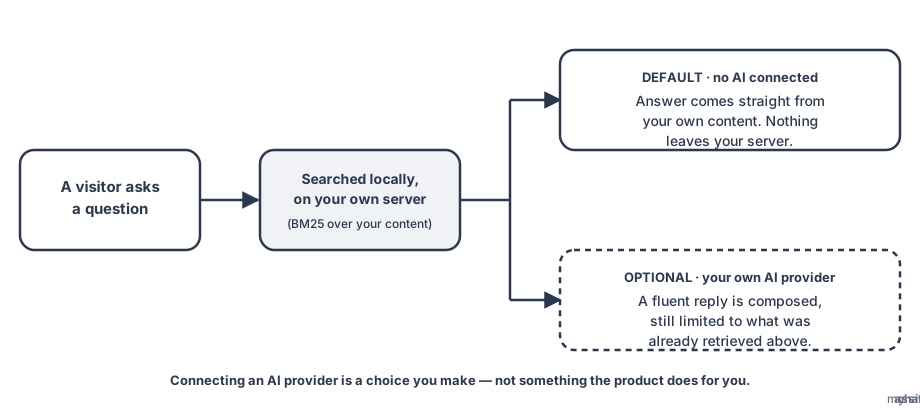
How a question gets answered — retrieval-only by default, AI only if you connect it.
Built for the Questions a Regulated Buyer Asks First
Before a compliance team signs off on any chatbot, they ask what it stores, what it does with a difficult message, and who it tells. Here's the honest, specific answer to each.
Safeguarding Detection, Not a Generated Reply
A visitor's message is checked for safeguarding language before any answer is generated. On a match, the product skips generation entirely and returns a fixed, operator-reviewed response, with a handoff offer to a person if one is configured. The visitor is never cut off.
Automatic PII Redaction
Common identifiers, an email address, a phone number, a UK National Insurance number, a UK NHS number, and a date of birth, are stripped from what gets stored, on every message, before anything is written to disk.